> ## Documentation Index
> Fetch the complete documentation index at: https://docs.bkstr.io/llms.txt
> Use this file to discover all available pages before exploring further.
# Analytics
> Monitor chat sessions, bookings, and widget performance
The analytics dashboard gives you visibility into how visitors interact with your booking assistant.
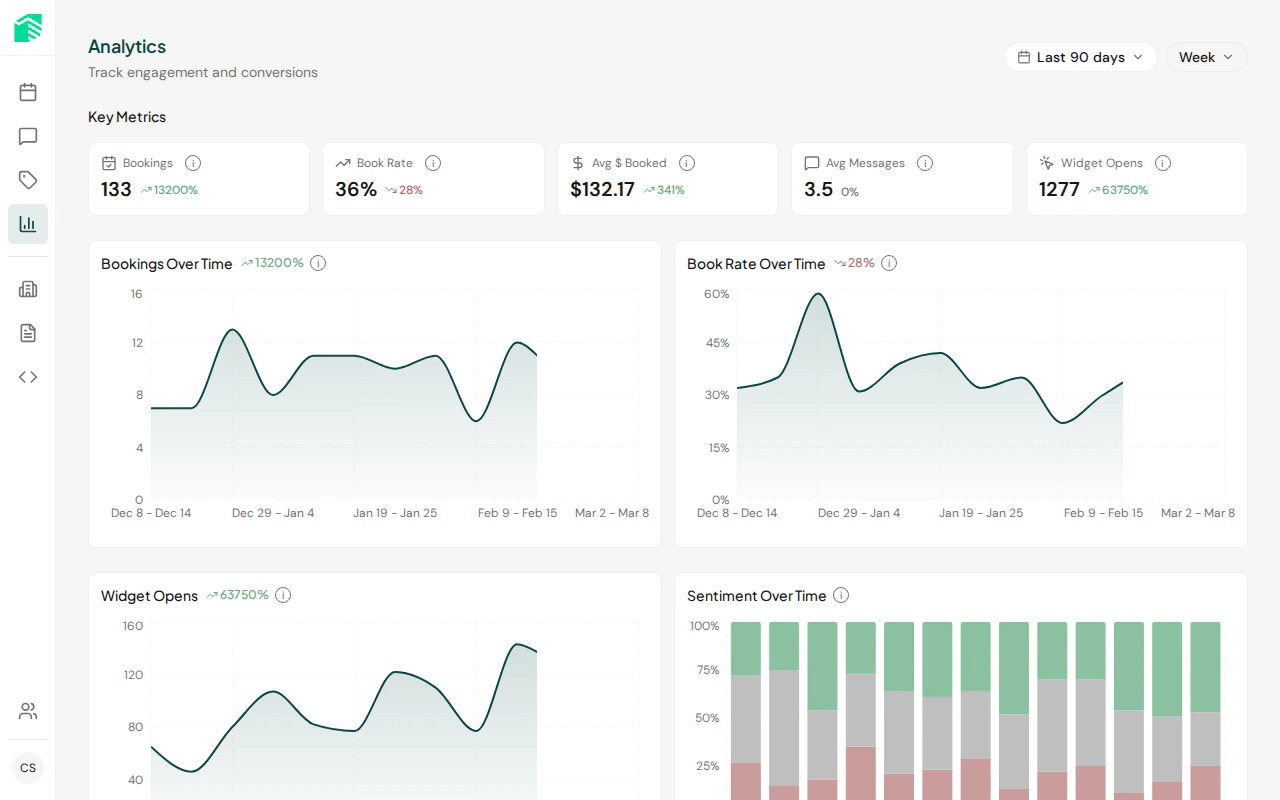 ## Metrics
| Metric | Description |
| ----------------- | ---------------------------------------------------- |
| **Chat sessions** | Total conversations started through the widget |
| **Bookings** | Booking requests submitted through the assistant |
| **Widget opens** | Number of times visitors opened the chat widget |
| **AI usage** | Token consumption and cost tracking for AI responses |
## Date ranges
Use the date picker to view analytics for different time periods. Data is available from the day you set up your account.
## Chat sessions
View individual chat sessions to see:
* The full conversation between the visitor and assistant
* Whether a booking was made
* Session duration and message count
* Sentiment analysis of the conversation
Click on any session to view the complete transcript.
## Booking requests
Track all bookings made through the chat widget, including:
* Service booked
* Visitor contact information
* Booking date and time
* Any discount codes applied
## Metrics
| Metric | Description |
| ----------------- | ---------------------------------------------------- |
| **Chat sessions** | Total conversations started through the widget |
| **Bookings** | Booking requests submitted through the assistant |
| **Widget opens** | Number of times visitors opened the chat widget |
| **AI usage** | Token consumption and cost tracking for AI responses |
## Date ranges
Use the date picker to view analytics for different time periods. Data is available from the day you set up your account.
## Chat sessions
View individual chat sessions to see:
* The full conversation between the visitor and assistant
* Whether a booking was made
* Session duration and message count
* Sentiment analysis of the conversation
Click on any session to view the complete transcript.
## Booking requests
Track all bookings made through the chat widget, including:
* Service booked
* Visitor contact information
* Booking date and time
* Any discount codes applied